Comprehensive business intelligence and analytics for clinic performance, revenue tracking, and data-driven decision making.
Overview
KiviCare Pro includes powerful reporting and analytics features to help you understand your clinic’s performance, track revenue, monitor appointments, and make data-driven decisions.
Key Benefits
- Visual Analytics: Beautiful charts and graphs
- Revenue Tracking: Clinic and doctor-wise revenue
- Appointment Analytics: Booking patterns and trends
- Multi-Clinic Comparison: Compare performance across locations
- Doctor Performance: Track individual doctor metrics
- Export Capability: Download reports for presentations
- Real-Time Data: Always up-to-date information
Available Reports
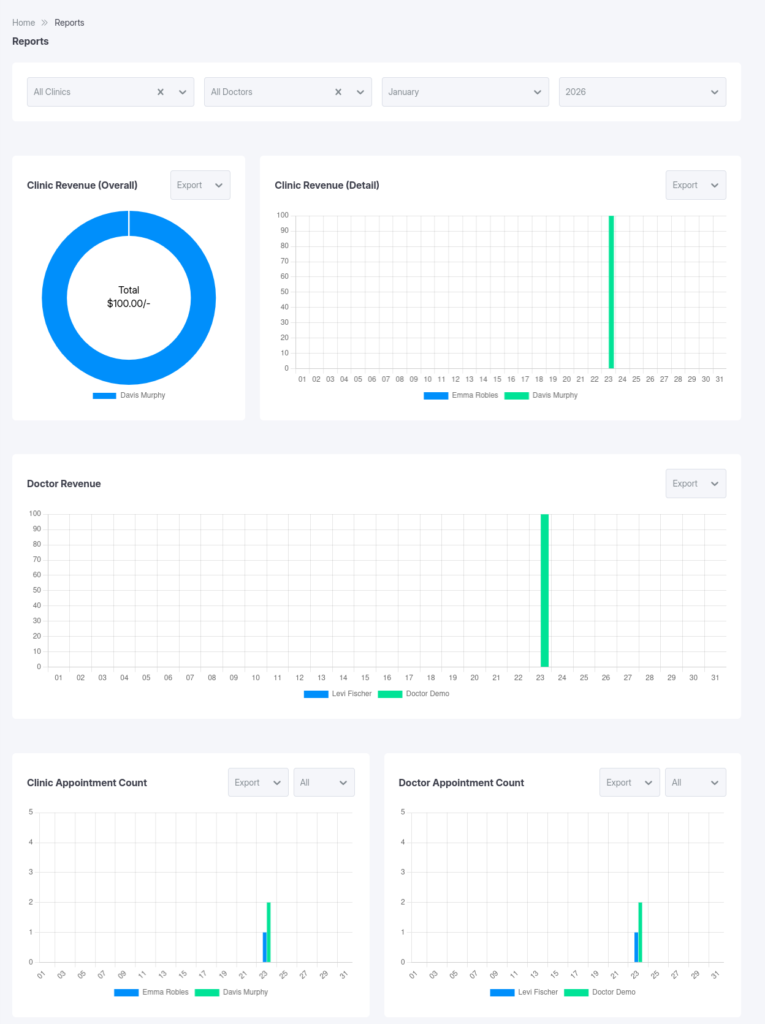
1️⃣ Clinic Revenue (Overall)
Chart Type: Doughnut / Pie Chart
Purpose: See revenue distribution across all clinics at a glance
Displays
- Total revenue per clinic
- Percentage of total revenue
- Visual comparison between clinics
- Color-coded by clinic
Example
Total Revenue: $125,000

Downtown Clinic: $60,000 (48%)
Uptown Clinic:   $45,000 (36%)
Westside Clinic: $20,000 (16%)
Use Cases
- Identify top-performing clinics
- Spot underperforming locations
- Justify expansion decisions
- Allocate resources effectively
2️⃣ Clinic Revenue (Detail)
Chart Type: Bar Chart
Purpose: Detailed month-by-month or clinic comparison
Displays
- Revenue bars for each clinic
- Side-by-side comparison
- Trend analysis
- Actual dollar amounts
Filter Options
- Specific month or all months
- Specific year
- Single clinic or all clinics
Example
January 2026:
Downtown: $15,000 ████████████████
Uptown:   $12,000 ████████████
Westside: $ 6,000 ██████
Insights
- Month-over-month growth
- Seasonal patterns
- Clinic comparison
- Performance trends
3️⃣ Doctor Revenue
Chart Type: Bar Chart
Purpose: Track revenue generated by each doctor
Displays
- Revenue per doctor
- Comparison across doctors
- Filter by clinic
- Time-based analysis
Filter Options
- All doctors or specific doctor
- Specific clinic
- Month and year selection
Example
Dr. Smith: $25,000 ████████████████████
Dr. Jones: $18,000 ██████████████
Dr. Lee:   $15,000 ████████████
Metrics Include
- Total revenue generated
- Number of appointments
- Average revenue per appointment
- Billing efficiency
4️⃣ Clinic Appointment Count
Chart Type: Bar Chart
Purpose: Monitor appointment volume per clinic
Displays
- Total appointments by clinic
- Status breakdown
- Comparison across clinics
- Trend over time
Status Filters
- All
- Booked
- Pending
- Completed
- Check-in
- Cancelled
Example
Downtown Clinic:
├─ Booked: 150
├─ Completed: 280
├─ Cancelled: 20
└─ Total: 450
Key Metrics
- Appointment volume
- Cancellation rate
- Completion rate
- Booking trends
5️⃣ Doctor Appointment Count
Chart Type: Bar Chart
Purpose: Track appointment volume per doctor
Displays
- Appointments per doctor
- Status breakdown
- Workload comparison
- Capacity utilization
Example
Dr. Smith: 230 ██████████████████
Dr. Jones: 180 ██████████████
Dr. Lee:   150 ████████████
Insights
- Doctor utilization
- Workload balance
- Scheduling efficiency
- Capacity planning
Reports Dashboard
Accessing Reports
- Menu: Dashboard → Reports
Access Levels
- Administrator: All reports
- Clinic Admin: Own clinic
- Doctor: Own statistics
- Receptionist: Limited (if enabled)
Filter Controls
Clinic Filter
[All Clinics ▼]
Doctor Filter
[All Doctors ▼]
Month Filter
[Current Month ▼]
Year Filter
[2026 ▼]
Applying Filters
- Select clinic
- Select doctor (optional)
- Choose month/year
- Charts update automatically
Reading Charts
Doughnut Chart
- Each slice = clinic
- Size = revenue share
- Hover for details
Bar Charts
- Height = value
- X-axis = clinic/doctor
- Y-axis = revenue/count
- Hover for breakdown
Analysis & Insights
Revenue Analysis
- Top-performing clinics
- Growth/decline trends
- Seasonal patterns
- Doctor profitability
Appointment Analytics
Cancellation Rate
Cancelled ÷ Total × 100
Completion Rate
Completed ÷ Total × 100
Doctor Performance
- Workload balance
- Revenue per appointment
- Patient retention
Exporting Reports
Export Formats
- CSV / Excel
- PNG / JPG
Export Methods
- Browser print
- Screenshot
- Export button (if available)
Custom Date Ranges
- Month-over-month
- Year-over-year
- Quarterly comparison
Best Practices
Review Frequency
- Weekly: Appointments
- Monthly: Revenue
- Quarterly: Strategy
- Annually: Growth
KPIs to Track
- MRR
- ARPU
- Booking Rate
- No-show Rate
- Patient LTV
Troubleshooting
No Data Showing
- Relax filters
- Check permissions
- Verify date range
Charts Not Updating
- Hard refresh
- Clear cache
- Check console
Export Issues
- Disable pop-up blocker
- Try a different browser
- Use screenshots
Mobile & Responsive
- Fully responsive charts
- Touch & gesture enabled
- Best viewed on tablet/desktop
Related Features
- Multi-Clinic Management
- Billing & Tax System
- Medical Reports
Advanced Analytics (Future)
- Predictive analytics
- Revenue forecasting
- Custom report builder
- Scheduled reports
- Dashboard widgets