The Follow-up and Treatment Module in KiviCare helps healthcare providers manage long-term patient care after the initial consultation.
This module allows clinics to:
- Track patient progress
- Organize treatments using Treatment Chains
- Schedule and manage follow-up appointments
- Prevent missed patient visits through a structured follow-up system
It ensures better patient retention, improved treatment monitoring, and organized clinical workflows.
1. Core Concepts
What is a Follow-up?
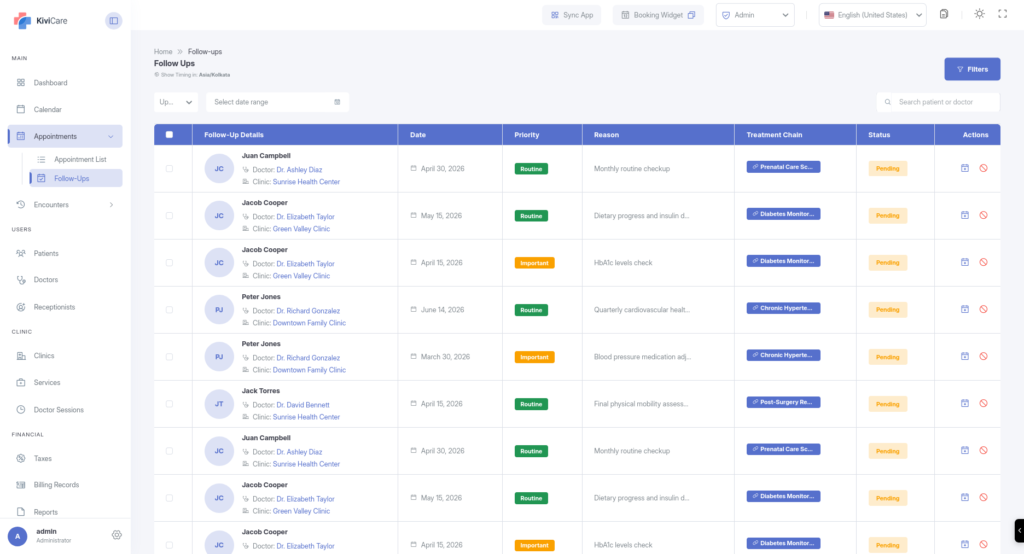
A Follow-up is a planned medical visit scheduled after a patient encounter.
Follow-ups help doctors:
- Monitor treatment progress
- Review test results
- Continue ongoing therapy
- Check recovery status
Key Features
- Doctor Link – Every follow-up is assigned to a specific doctor.
- Clinic Association – The follow-up belongs to a particular clinic.
- Patient Tracking – Connected directly to the patient profile.
- Recommended Timeframe – Doctors define when the patient should return (for example: after 7 days or next Monday).
Once created, clinic staff can convert the follow-up into a confirmed appointment.
What is a Treatment Chain?
A Treatment Chain groups multiple follow-ups and appointments under a single treatment goal.
Examples:
- Post-Surgery Recovery
- Diabetes Management Plan
- Physiotherapy Cycle
- Long-term Medication Monitoring
Instead of managing follow-ups separately, Treatment Chains provide a structured treatment journey.
Benefits of Treatment Chains
Chronological Timeline
Doctors and staff can see:
- Previous appointments
- Current treatment stage
- Upcoming follow-ups
Clinical Workflow Management
Each chain has its own status:
- Active
- On Hold
- Closed
This helps track the overall progress of a patient’s treatment plan.
2. For Doctors – Clinical Management
Creating a Follow-up
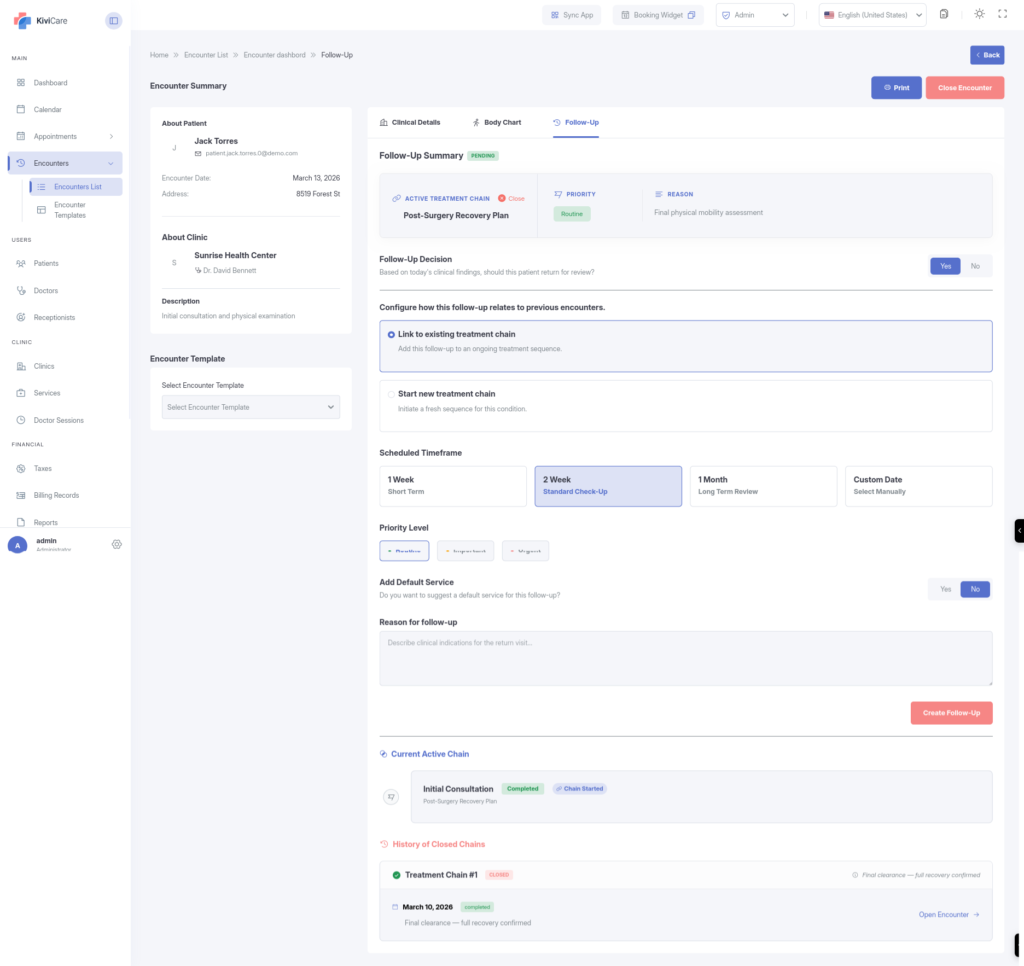
Doctors can create follow-ups during a patient encounter from the Follow-up Tab.
Steps
- Select Treatment Chain
Choose one of the following:
- Add to an existing active chain
- Create a new treatment chain
Example:
“Physiotherapy Cycle – Week 1”
- Set Priority Level
Follow-ups can be marked as:
- Routine
- Important
- Urgent
Urgent follow-ups are visually highlighted for the front desk team.
- Define the Timeframe
Doctors can set the expected return period.
Examples:
- After 3 days
- After 1 week
- Next Monday
- Within 10 days
- Add Clinical Notes
Doctors can add instructions such as:
- Required tests
- Medication review
- Therapy continuation
- Follow-up examination
This helps clinic staff prepare properly for the next appointment.
3. For Front Desk – Scheduling & Operations
Follow-up Dashboard
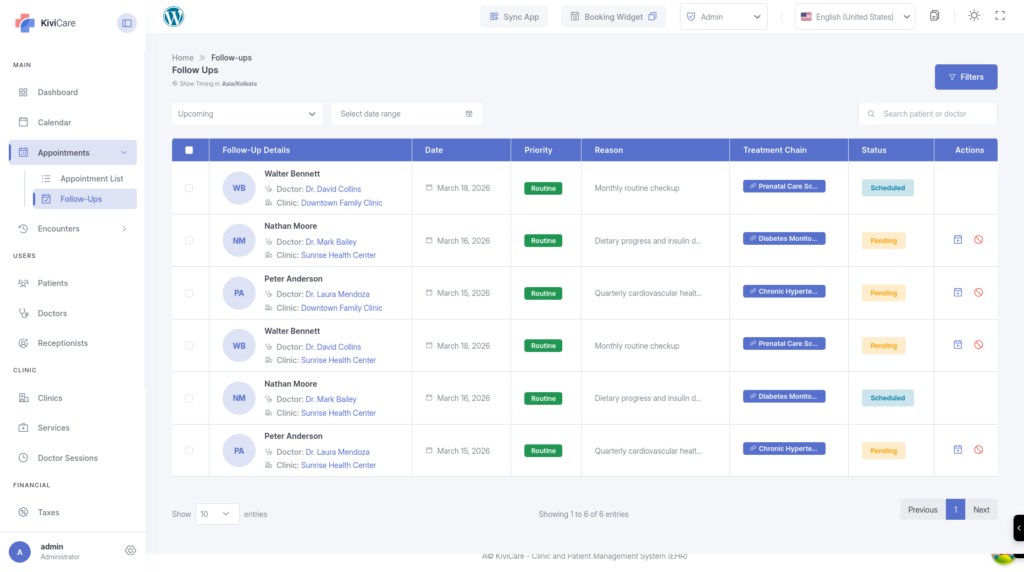
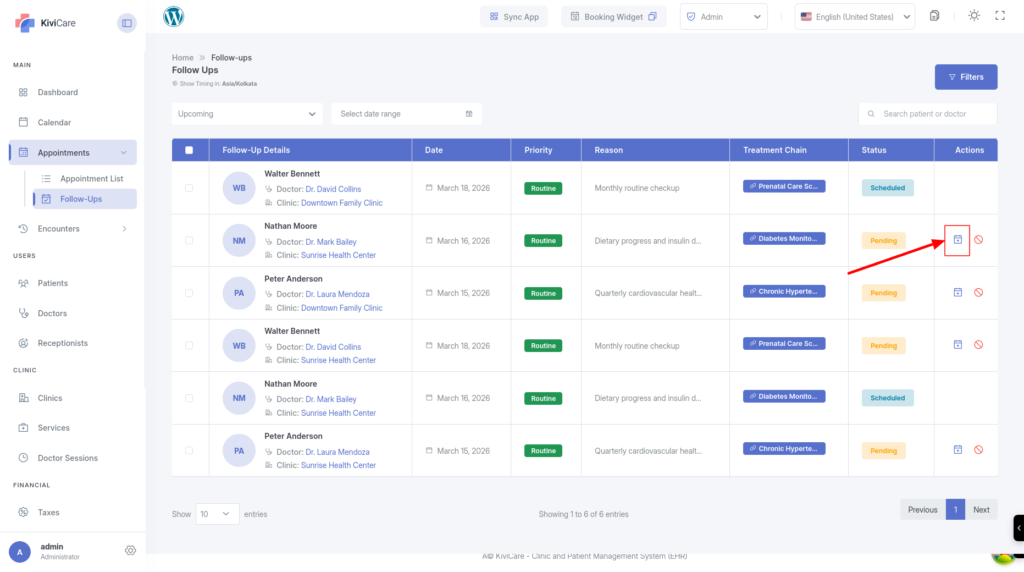
The Follow-up Dashboard is the central place where clinic staff manage all follow-up requests.
The dashboard helps staff:
- Track upcoming follow-ups
- Identify missed appointments
- Schedule new appointments quickly
Dashboard Tabs
Upcoming
Displays patients whose follow-up visits are approaching.
Past (Overdue)
Shows patients who missed their recommended follow-up date.
Overdue records are highlighted in red so the front desk team can prioritize them.
Dashboard Filters
Staff can filter follow-ups by:
- Doctor
- Clinic
- Treatment Chain
- Status
This helps organize daily scheduling and patient call lists.
Scheduling a Follow-up Appointment
Follow-ups can easily be converted into appointments.
Steps
- Locate a Pending Follow-up on the dashboard.
- Click the Calendar (Schedule) Icon.
- The appointment booking screen will open automatically.
The system will pre-fill:
- Patient details
- Doctor
- Clinic
- Select the appointment date and time.
- Save the appointment.
The follow-up status automatically changes from Pending → Scheduled.
4. For Patients – Treatment Journey Overview
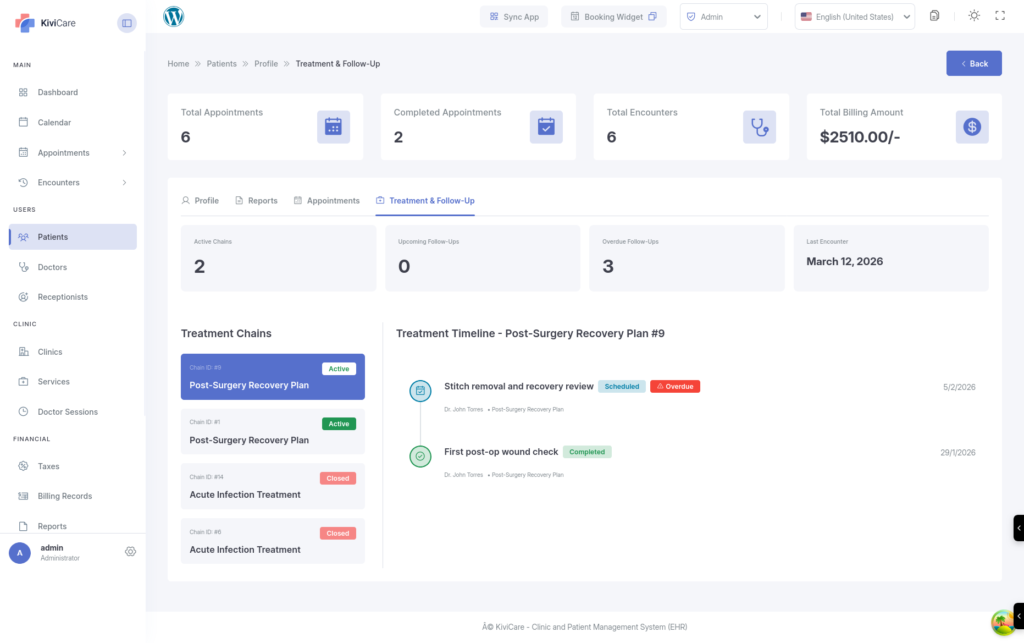
Inside the patient profile, the Treatment & Follow-up Tab provides a complete overview of the patient’s medical journey.
Patient Profile Features
Clinical Summary
Displays key statistics such as:
- Active Treatment Chains
- Upcoming Appointments
- Last Encounter Date
Interactive Treatment Timeline
Shows a chronological view of:
- Past visits
- Current treatment stage
- Scheduled follow-ups
Treatment Chain Switcher
Patients can have multiple treatment plans.
Example:
- Diabetes Treatment
- Orthopedic Recovery
Staff can switch between chains to view progress for each condition.
5. Follow-up Status Meanings
| Status | Description |
|---|---|
| Pending | Doctor requested the follow-up, but no appointment is scheduled yet |
| Scheduled | Appointment has been successfully booked |
| Completed | Patient attended the visit and the encounter was finalized |
| Overdue | Recommended follow-up date passed without scheduling |
| Cancelled | Follow-up is no longer required |
6. Pro Tips for Advanced Users
Automated Reminders
Use Reminder Settings inside follow-ups to send:
- SMS reminders
- Email notifications
This reduces missed appointments.
Use On-Hold Chains
If treatment pauses temporarily:
Set the treatment chain to On-Hold.
This prevents overdue alerts from cluttering the dashboard.
Clinical Audit Logs
Audit logs track:
- Who updated the treatment status
- When changes were made
- The reason for the update
This is important for medical compliance and patient history tracking.
Module Requirements
The Follow-up & Treatment Module requires the Pro version of KiviCare.
You can enable or disable this module from:
Settings → Configurations → Follow-up Settings