Advanced Feature
Last updated 8 months ago
Overview
KiviCare Pro includes advanced payment gateway integrations for seamless online payment collection during appointment booking.
Pro Payment Gateways (Included in Pro):
- WooCommerce – Full e-commerce integration with all WooCommerce payment methods
Note: PayPal and Pay Later options are available in KiviCare Lite and do not require Pro.
Pro Gateway Features:
- WooCommerce integration with full e-commerce capabilities
- Secure PCI-compliant payment processing
- Automatic payment notifications
- Advanced payment reports
- Auto-cancellation for unpaid appointments
- Tax calculation and application
WooCommerce Payment Gateway (Pro)
Overview
Best For:
- Clinics using WooCommerce
- Clinics needing full e-commerce features
- Flexible payment methods
- Inventory and order management
Features:
- Uses all WooCommerce payment methods
- Credit/Debit cards, PayPal, Stripe, etc.
- Automatic product creation for services
- Full order management
- WooCommerce reports
- Tax calculation via WooCommerce
- Refund management
- Auto-cancel unpaid bookings
Prerequisites
Required Plugins
- WooCommerce
- Install and activate
- Complete setup wizard
- Payment Gateway for WooCommerce
- Install Stripe, PayPal, etc.
- Configure settings
- Test in sandbox mode
WooCommerce Configuration
WooCommerce → Settings → General
- Base Location
- Currency
- Currency Position

WooCommerce → Settings → Payments
- Enable preferred payment gateways
Setup Steps
Step 1: Enable WooCommerce Gateway
- KiviCare → Settings → Payment Settings
- Enable WooCommerce
- Save settings
Step 2: Verify WooCommerce Products
- Products are auto-created by KiviCare
- One product per service + doctor + clinic
- Products are hidden and auto-managed
Do Not:
- Edit products manually
- Delete products
Step 3: Configure WooCommerce Checkout
WooCommerce → Settings → Advanced
- Cart page
- Checkout page
- My account page
How It Works
Patient Booking Flow
- Appointment created with Pending status
- WooCommerce product created/updated
- Product added to cart
- Patient redirected to cart and checkout
- Payment completed or failed
Status Result
- Success → Appointment Booked
- Failure → Appointment Cancelled
Auto-Cancellation
Unpaid appointments are auto-cancelled after 5 minutes (customizable).
add_filter('kivicare_wc_auto_cancel_schedule_time', function($time) {
    return time() + 600;
});
Order Management
- WooCommerce → Orders
- Appointment ID linked to order meta
- Bi-directional reference between order and appointment
Order Status Mapping
| WooCommerce Status | Appointment Status |
|---|
| Pending | Pending |
| Processing | Booked |
| Completed | Booked |
| Cancelled | Cancelled |
| Failed | Cancelled |
| Refunded | Cancelled |
Taxes & Fees
- Taxes calculated in KiviCare
- Added as WooCommerce fees
- No duplicate tax calculation
Refunds
Refund Methods
- Refund via WooCommerce order
- Refund via payment gateway dashboard
- Full refund cancels appointment
- Partial refund keeps appointment active
Payment Settings (Pro Gateways)
Global Configuration
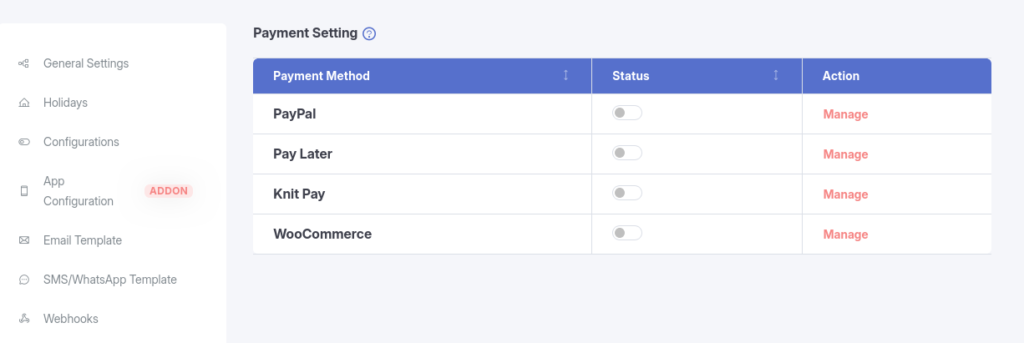
KiviCare → Settings → Payment Settings

- Enable WooCommerce
- Default gateway
- Require payment before booking
- Payment notifications
- Failed payment handling
Payment Reports
Payment History
- Filter by date, gateway, status, clinic, doctor
- Export CSV
Payment Analytics
- Total revenue
- Paid vs pending payments
- Gateway-wise usage
- Success rate
Troubleshooting
WooCommerce Checkout Issues
- Session conflicts
- Cart not loading
- Product creation failure
Payment Pending Forever
- Webhook misconfiguration
- Order status mismatch
Duplicate Charges
- Page refresh
- Multiple clicks
- Session issues
Best Practices
Security
- Use HTTPS
- Keep plugins updated
- Protect API keys
- Test in sandbox mode
Testing
- Test each gateway
- Test failures and refunds
- Test concurrency
User Experience
- Clear payment instructions
- Proper failure messages
- Clear retry options
Related Features
- Billing & Tax System
- Multi-Clinic Management
- Reports & Analytics
