Settings & Configuration
Last updated 6 months ago
1. Overview
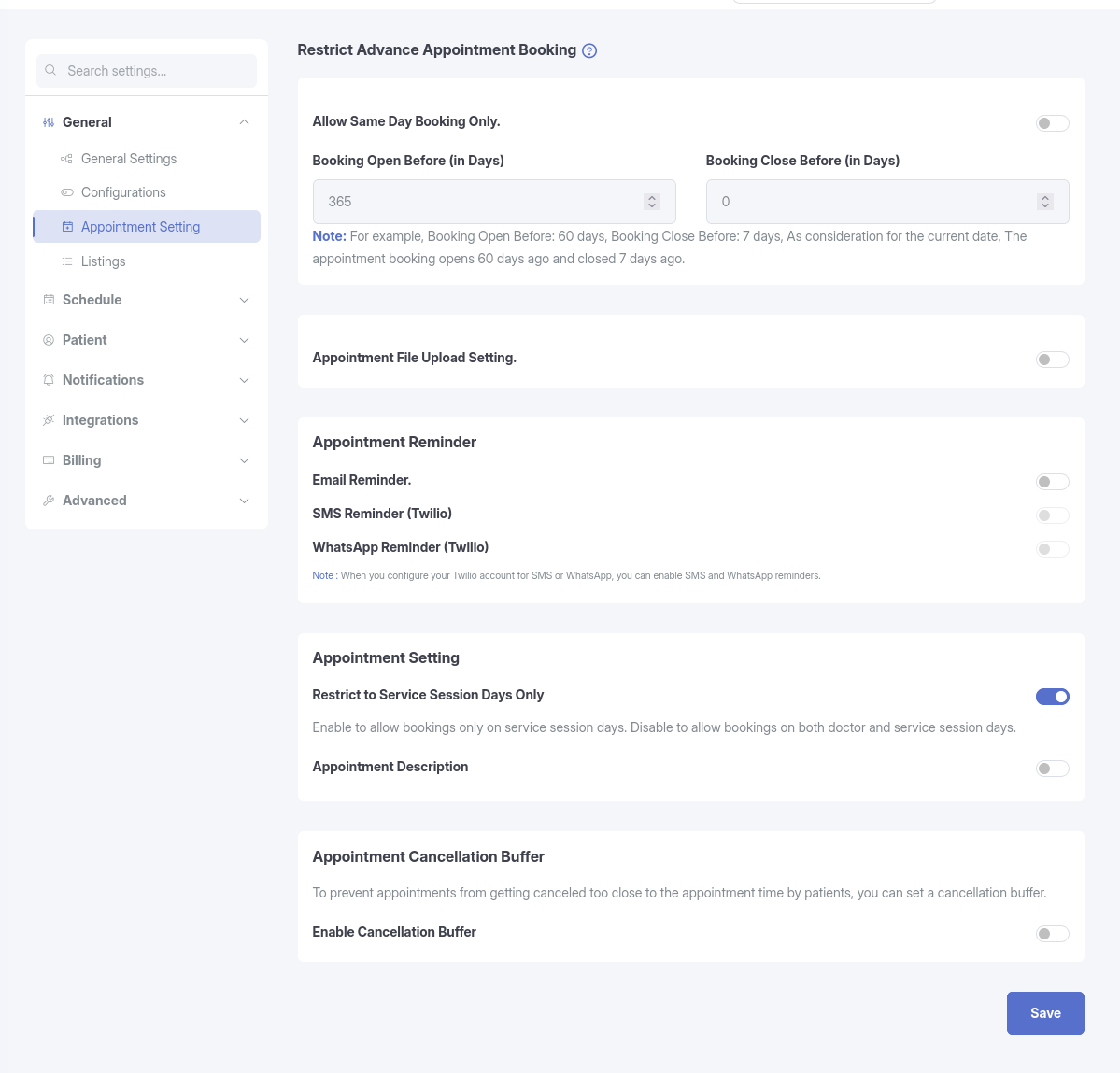
The Appointment Settings page allows administrators to control how and when patients can book appointments. It provides configuration options for booking timeframes, reminders, file uploads, cancellation rules, and general appointment behavior.
2. Key Features
A. Restrict Advance Appointment Booking
Control the time window in which patients are allowed to schedule appointments.
Allow Same Day Booking Only
- When enabled, patients can book appointments only for the current date.
- Future date bookings are disabled.
Booking Open Before (in Days)
- Defines how far in advance appointments can be booked.
- Example: Setting this to 60 allows bookings up to 60 days from today.
Booking Close Before (in Days)
- Defines the minimum advance notice required to book an appointment.
- Example: Setting this to 1 means bookings must be made at least 1 day in advance.
Note: The Booking Close Before value must be smaller than the Booking Open Before value.
B. File Upload Setting
Allow patients to upload relevant documents during appointment booking.
Appointment File Upload Setting
- Enables document uploads such as:
- Medical reports
- ID verification
- Prescriptions
C. Appointment Reminder
Automate reminders to reduce missed appointments and improve attendance.
Reminder Channels:
- Email Reminder – Sends an automated email notification
- SMS Reminder (Twilio) – Sends an SMS reminder (Pro feature)
- WhatsApp Reminder (Twilio) – Sends a WhatsApp reminder (Pro feature)
Select Hours
- Determines how many hours before the appointment the reminder is sent.
- Example: Setting this to 24 sends the reminder one day before the appointment.
D. Cancellation Buffer
Restrict last-minute appointment cancellations.
Enable Cancellation Buffer
- Activates the cancellation time restriction.
Select Hours
- Defines the lock-in period before the appointment.
- Example: If set to 24, patients cannot cancel appointments scheduled within the next 24 hours.
E. General Appointment Settings
Restrict to Service Session Days Only (Pro feature)
This setting controls which session days are shown to patients when booking an appointment for a specific service.
- Enabled: Patients can only book appointments on the days that belong to the service’s own session. Doctor session days will be hidden for that service.
- Disabled: Patients can book appointments on both doctor session days and service session days. However, if a day is available in both (e.g., Wednesday), the service session takes priority and its time slots will be used.
Appointment Description
- Enables a description field during booking.
- Allows patients or staff to add details or reasons for the visit.