KiviCare uses an automated email system to keep patients, doctors, and staff informed about important activities. This includes booking confirmations, schedule changes, and appointment reminders.
1. Automated Notifications
The system automatically triggers emails for key events. These are often pre-configured by the Administrator.
Common Notification Types
Appointment Booked: Sent to the Patient and Doctor when a new booking is confirmed.
Appointment Canceled: Sent if an appointment is called off by either party.
Registration Success: Sent to new Patients upon signing up, often containing login credentials.
Bill/Invoice: Sent to the patient after a payment is recorded.
2. Managing Email Templates
Administrators can customize the content of every email sent by the system to ensure it matches the clinic’s branding and tone.
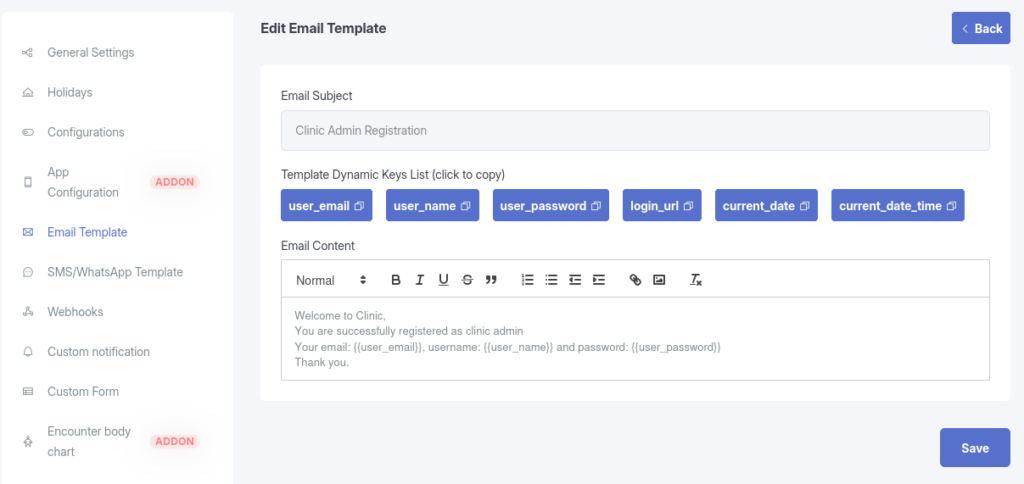
Description: A screenshot of Settings > Email Template showing the list of available templates and the “Edit” button.
Customization Options
Navigate to Settings > Email Template to access the editor.
Subject Line: Change the email subject (e.g., “Your Appointment at [Clinic Name] is Confirmed”).
Dynamic Keys: Use smart placeholders like {{patient_name}}, {{doctor_name}}, or {{appointment_date}}. These are automatically replaced with real data when the email is sent.
Rich Text Editor: Add bold text, links, or formatting to the email body.
Test Email: Use the “Send Test Email” feature to preview how a template looks before saving changes.
3. Appointment Reminders
To reduce no-shows, KiviCare includes a dedicated reminder system.
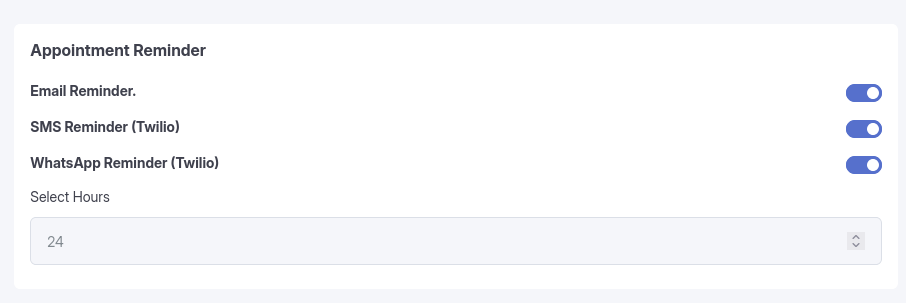
Description: A screenshot of Settings > Appointment Setting highlighting the “Email Reminder” toggle and “Select Hours” field.
Configuration
Managed via Settings > Appointment Setting:
Email Reminder: Toggle this ON to enable automatic reminders.
Timing: Set the “Select Hours” field (e.g., 24 hours) to determine how long before the appointment the email should be sent.
Pro Features: If the “Pro” add-on is active, you may also see options for SMS and WhatsApp reminders (requires Twilio integration).
4. Permissions
Administrators / Clinic Admins:
Manage: Full access to configure Email Templates and Reminder settings.
Doctors / Receptionists:
View Only: Generally do not have access to modify global email settings.
Patients:
Recipient: Patients do not see these settings; they only receive the notifications.