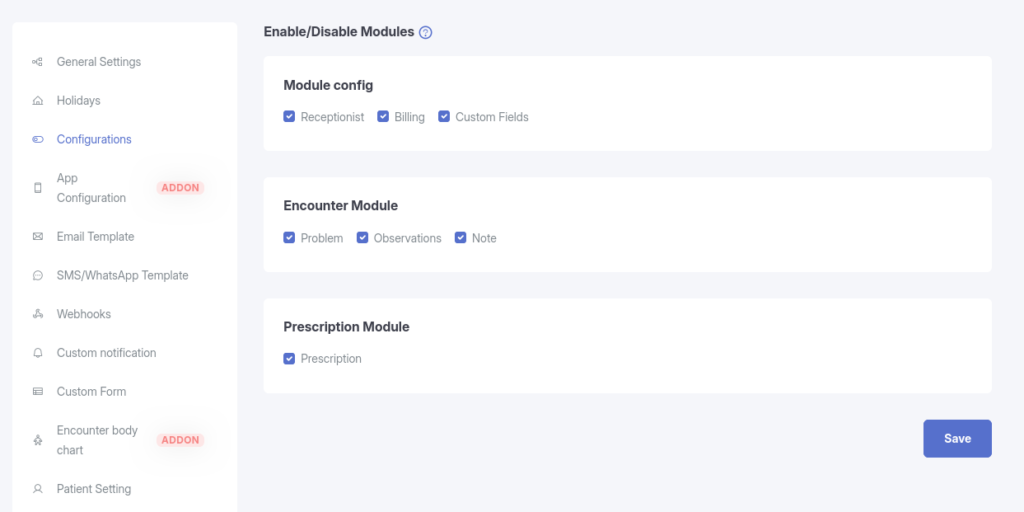
The System Configuration section allows administrators to enable or disable major system modules. Disabling a module will immediately restrict access and hide related features across the application.
1. Module Configuration
This section controls the availability of core system modules.
Receptionist Module
When enabled:
Receptionist users can be:
Listed
Added
Updated
Deleted
Receptionist-related features remain accessible throughout the system.
When disabled:
Receptionist’s list will not be accessible
Adding, updating, or deleting receptionist users will be blocked
All receptionist-related functionality will be restricted
Use case: Disable this module if your clinic or organization does not use receptionist roles.
Billing Module
When enabled:
Billing-related features remain available
Users can access billing workflows and data
When disabled:
Billing functionality becomes inaccessible
All billing-related screens and actions are restricted
Use case: Useful if billing is handled externally or not required in your workflow.
Custom Fields Module
When enabled:
Custom Fields settings are available under: Dashboard → Settings → Custom Fields
Custom fields appear in their respective selected modules (e.g., Appointment, Encounter, etc.)
When disabled:
Custom Fields menu will not be accessible from Dashboard → Settings
Previously created custom fields will not be displayed in any selected modules
No custom field data will be shown or editable
Use case: Disable this module to simplify the system and remove all custom field functionality.
2. Encounter Module(Available in Pro version)
These settings control which sections are available inside the Encounter module.
You can enable or disable the following encounter components:
Problem
Controls visibility of the Problem section within encounters
Observations
Controls visibility of the Observations section within encounters
Note
Controls the visibility of the Notes section within encounters
When a section is disabled:
It will not appear in the encounter UI
Users cannot add or view data related to that section
Use case: Customize encounter forms based on your clinical workflow and documentation requirements.
3. Prescription Module(Available in Pro version)
Prescription
When enabled:
Prescription functionality is available
Doctors can create and manage prescriptions
When disabled:
Prescription module will be hidden
Prescription-related actions and data will not be accessible
Use case: Disable this module if prescriptions are managed outside the system.