KiviCare’s GDPR (General Data Protection Regulation) functionality is designed to help clinics and healthcare providers comply with data protection laws. It offers comprehensive tools for managing patient consent, maintaining a detailed audit trail of data-related activities, and supporting data subject rights requests.
The GDPR module is integrated into the KiviCare ecosystem to ensure accountability, transparency, and regulatory compliance when handling sensitive patient health data.
2. Core Features
Consent Management: Enables clinics to obtain, record, and manage patient consent for various data processing activities.
Audit Trail: Provides a secure and comprehensive log of all GDPR-relevant actions, including data access, creation, modification, and deletion.
Data Subject Rights Support: Assists clinics in responding efficiently to patient requests such as the right to access their data and the right to be forgotten (data erasure).
3. Consent Management
3.1. Consent Configuration
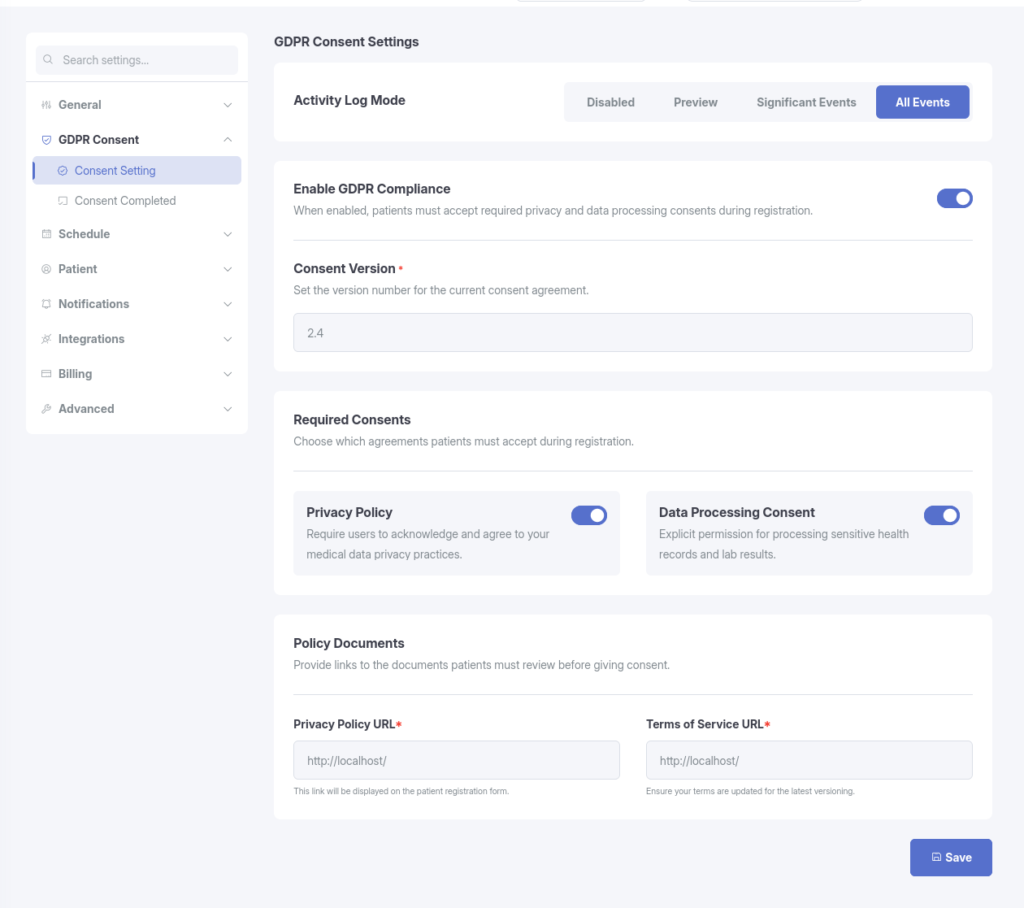
Clinics can configure GDPR consent settings directly from the KiviCare dashboard. Key configuration options include:
Enabling or disabling the GDPR module.
Setting and updating the consent version number.
Providing links to the clinic’s Privacy Policy and Terms of Service.
Defining which types of consent are mandatory for patients.
3.2. Patient Consent Process
During new patient registration, the system prompts patients to review and provide consent according to the clinic’s configured settings. All consents are recorded securely.
3.3. Re-consent Mechanism
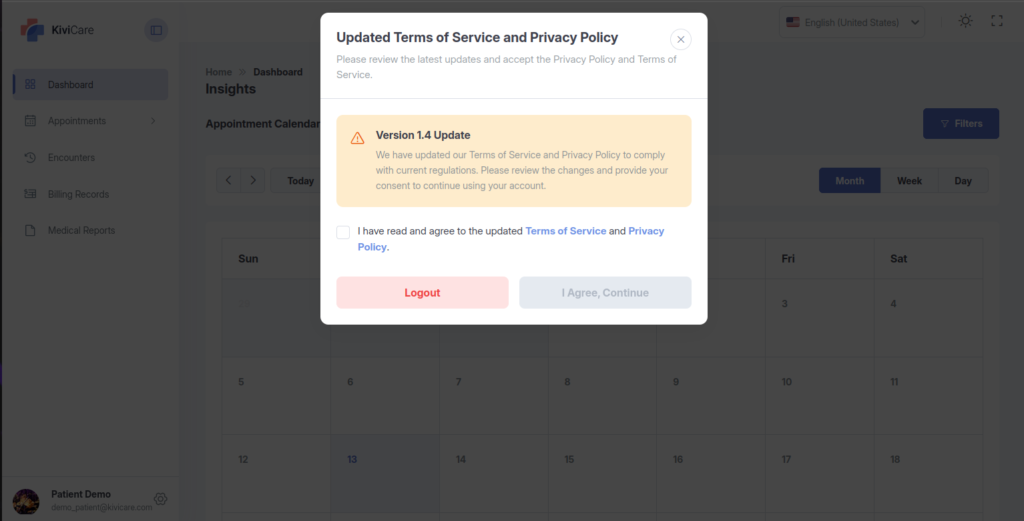
When a clinic updates its privacy policy, terms of service, or other consent-related documents, the consent version can be incremented. This automatically triggers a re-consent request for existing patients, ensuring they review and agree to the latest terms before continuing to use the system.
4. Audit Trail
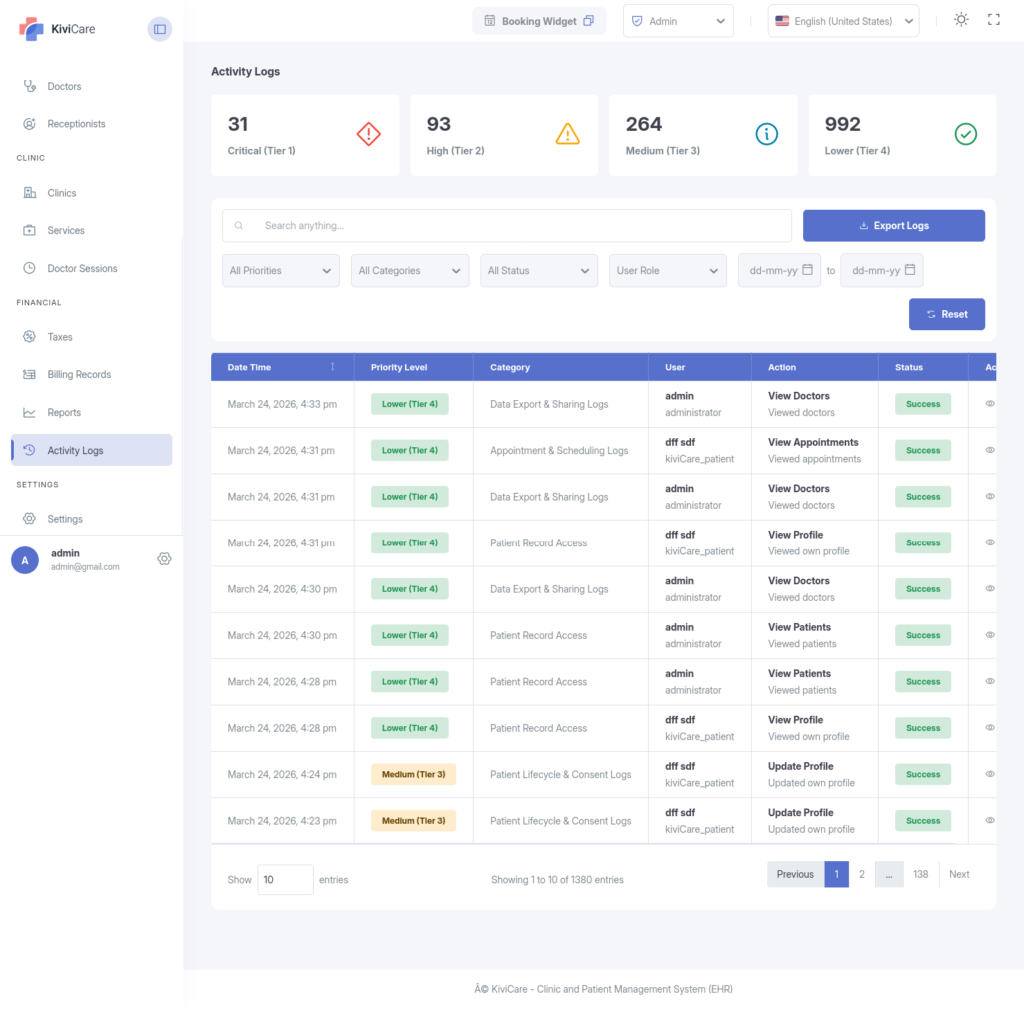
KiviCare employs a high-security logging service that records activities based on user-defined sensitivity levels.
The GDPR audit trail is a chronological record of all activities involving personal data. It plays a critical role in demonstrating compliance, investigating incidents, and maintaining accountability.
4.1. Activity Log Modes
Disabled: No logging (Not recommended for compliance).
Preview: Logs basic CRUD actions and Authentication.
Significant Events: (Recommended) Records mutations (Create/Update/Delete) and Security Incidents, but skips passive “Viewing” to save server space.
All Events: Forensic-level logging of every single interaction, including every time a record is opened.
4.2. Logged Activities
The following categories of events are automatically recorded:
Patient Data Activities
Creation of a new patient record
Viewing/accessing a patient’s record
Updating patient information
Deleting a patient record
Authentication Events
Successful user login
User logout
Failed login attempts
Appointment Activities
Creation of a new appointment
Viewing an appointment
Updating an appointment
Deleting an appointment
4.3. Viewing the Audit Trail
Clinic administrators can access the audit trail through the KiviCare dashboard. The interface supports filtering, searching, and exporting logs for easy review and reporting.
5.Managing Data Subject Rights
GDPR grants patients the right to access their data and the right to have it completely erased. KiviCare manages these requests through a secure, multi-step verification process.
Processing Data Export Requests (Right to Access)
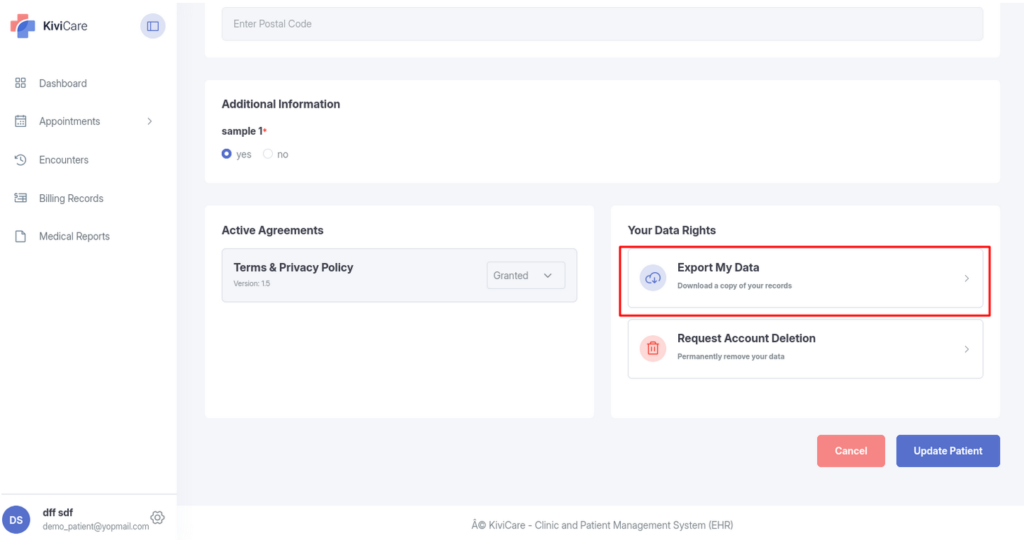
Patient Request: The patient logs into their KiviCare profile and clicks Export Personal Data. The system sends them a verification email.
Patient Verification: The patient opens the email and clicks the secure link to confirm they are the account owner. The request is now marked as “Confirmed.”
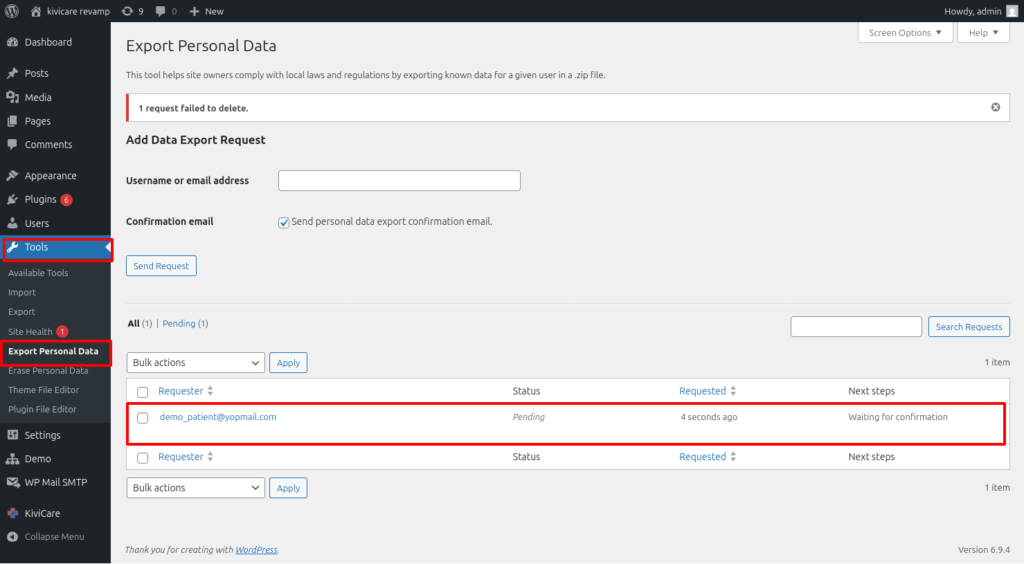
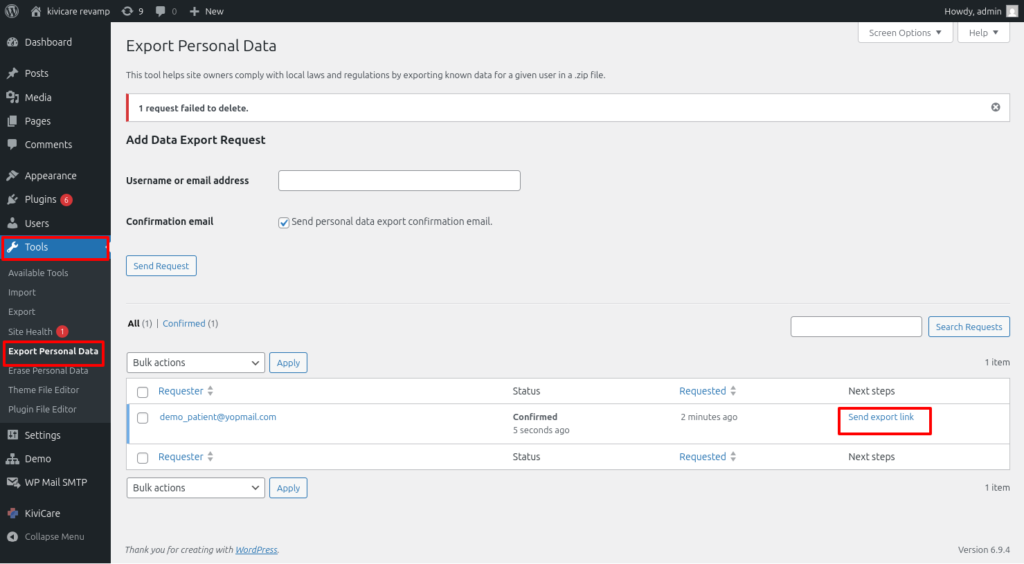
Admin Generation: The Clinic Administrator goes to Tools > Export Personal Data in the WordPress backend, locates the confirmed request, and clicks Send Export Link.
Data Delivery: The system compiles the patient’s profile, appointment, and billing data into a secure ZIP file and automatically emails the patient a temporary download link.
Processing Data Erasure Requests (Right to Be Forgotten)
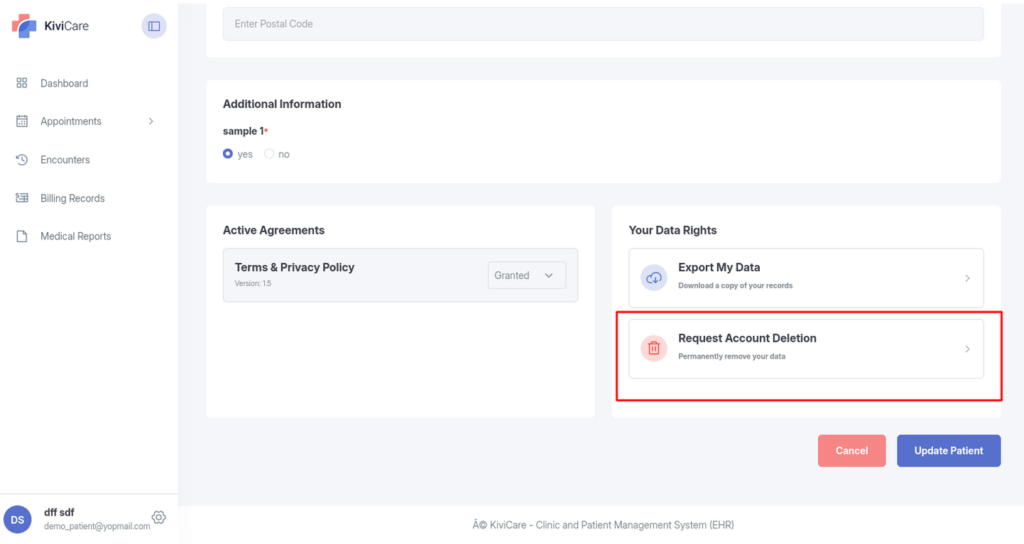
Patient Request: The patient logs into their KiviCare profile and clicks the Request Account Deletion button.
Immediate Data Scrubbing: The system instantly and permanently deletes the user account and scrubs all personal identifiers from associated appointments and medical records. This action happens immediately upon the patient’s request, requiring no email verification or administrator approval.
6. Setup and Configuration
Follow these steps to enable and configure the GDPR functionality in KiviCare:
Access KiviCare Settings Log in to your WordPress dashboard and navigate to the KiviCare settings area.
Enable the GDPR Module In the Modules or Add-ons section, activate the GDPR feature.
Configure Consent Settings Go to the GDPR Consent settings page and configure the following:
Enable GDPR compliance
Set the current consent version (e.g., 1.0, 1.1)
Enter the Privacy Policy URL
Enter the Terms of Service URL
Select mandatory consent types
Configure Activity Log Settings Navigate to the GDPR & Activity Log settings page to define log retention periods and select specific events to track.
Save All Changes Ensure all settings are saved to activate the configured GDPR features.
7. Best Practices for GDPR Compliance with KiviCare
Regularly review and update consent versions when policies change.
Monitor the audit trail periodically for unusual activity.
Document all data subject requests and how they were handled.
Ensure privacy policy and terms of service links are always up-to-date.
Train staff on using the GDPR tools within the KiviCare dashboard.